Deprecated: optional(): Implicitly marking parameter $callback as nullable is deprecated, the explicit nullable type must be used instead in /www/wwwroot/portal.artprinter.com.br/vendor/illuminate/support/helpers.php on line 190

Deprecated: with(): Implicitly marking parameter $callback as nullable is deprecated, the explicit nullable type must be used instead in /www/wwwroot/portal.artprinter.com.br/vendor/illuminate/support/helpers.php on line 430

Deprecated: Jenssegers\Blade\Blade::__construct(): Implicitly marking parameter $container as nullable is deprecated, the explicit nullable type must be used instead in /www/wwwroot/portal.artprinter.com.br/vendor/jenssegers/blade/src/Blade.php on line 34

Deprecated: Illuminate\Container\Container::beforeResolving(): Implicitly marking parameter $callback as nullable is deprecated, the explicit nullable type must be used instead in /www/wwwroot/portal.artprinter.com.br/vendor/illuminate/container/Container.php on line 1151

Deprecated: Illuminate\Container\Container::resolving(): Implicitly marking parameter $callback as nullable is deprecated, the explicit nullable type must be used instead in /www/wwwroot/portal.artprinter.com.br/vendor/illuminate/container/Container.php on line 1171

Deprecated: Illuminate\Container\Container::afterResolving(): Implicitly marking parameter $callback as nullable is deprecated, the explicit nullable type must be used instead in /www/wwwroot/portal.artprinter.com.br/vendor/illuminate/container/Container.php on line 1191

Deprecated: Illuminate\Container\Container::setInstance(): Implicitly marking parameter $container as nullable is deprecated, the explicit nullable type must be used instead in /www/wwwroot/portal.artprinter.com.br/vendor/illuminate/container/Container.php on line 1430

Deprecated: Illuminate\Contracts\Container\Container::beforeResolving(): Implicitly marking parameter $callback as nullable is deprecated, the explicit nullable type must be used instead in /www/wwwroot/portal.artprinter.com.br/vendor/illuminate/contracts/Container/Container.php on line 200

Deprecated: Illuminate\Contracts\Container\Container::resolving(): Implicitly marking parameter $callback as nullable is deprecated, the explicit nullable type must be used instead in /www/wwwroot/portal.artprinter.com.br/vendor/illuminate/contracts/Container/Container.php on line 209

Deprecated: Illuminate\Contracts\Container\Container::afterResolving(): Implicitly marking parameter $callback as nullable is deprecated, the explicit nullable type must be used instead in /www/wwwroot/portal.artprinter.com.br/vendor/illuminate/contracts/Container/Container.php on line 218

Deprecated: Illuminate\View\FileViewFinder::__construct(): Implicitly marking parameter $extensions as nullable is deprecated, the explicit nullable type must be used instead in /www/wwwroot/portal.artprinter.com.br/vendor/illuminate/view/FileViewFinder.php on line 53

Deprecated: Illuminate\Support\Traits\Conditionable::when(): Implicitly marking parameter $callback as nullable is deprecated, the explicit nullable type must be used instead in /www/wwwroot/portal.artprinter.com.br/vendor/illuminate/conditionable/Traits/Conditionable.php on line 21

Deprecated: Illuminate\Support\Traits\Conditionable::when(): Implicitly marking parameter $default as nullable is deprecated, the explicit nullable type must be used instead in /www/wwwroot/portal.artprinter.com.br/vendor/illuminate/conditionable/Traits/Conditionable.php on line 21

Deprecated: Illuminate\Support\Traits\Conditionable::unless(): Implicitly marking parameter $callback as nullable is deprecated, the explicit nullable type must be used instead in /www/wwwroot/portal.artprinter.com.br/vendor/illuminate/conditionable/Traits/Conditionable.php on line 53

Deprecated: Illuminate\Support\Traits\Conditionable::unless(): Implicitly marking parameter $default as nullable is deprecated, the explicit nullable type must be used instead in /www/wwwroot/portal.artprinter.com.br/vendor/illuminate/conditionable/Traits/Conditionable.php on line 53

Deprecated: Illuminate\Support\Arr::first(): Implicitly marking parameter $callback as nullable is deprecated, the explicit nullable type must be used instead in /www/wwwroot/portal.artprinter.com.br/vendor/illuminate/collections/Arr.php on line 188

Deprecated: Illuminate\Support\Arr::last(): Implicitly marking parameter $callback as nullable is deprecated, the explicit nullable type must be used instead in /www/wwwroot/portal.artprinter.com.br/vendor/illuminate/collections/Arr.php on line 219

Deprecated: Illuminate\Events\Dispatcher::__construct(): Implicitly marking parameter $container as nullable is deprecated, the explicit nullable type must be used instead in /www/wwwroot/portal.artprinter.com.br/vendor/illuminate/events/Dispatcher.php on line 75

Deprecated: Illuminate\View\Compilers\BladeCompiler::anonymousComponentPath(): Implicitly marking parameter $prefix as nullable is deprecated, the explicit nullable type must be used instead in /www/wwwroot/portal.artprinter.com.br/vendor/illuminate/view/Compilers/BladeCompiler.php on line 811

Deprecated: Illuminate\View\Compilers\BladeCompiler::anonymousComponentNamespace(): Implicitly marking parameter $prefix as nullable is deprecated, the explicit nullable type must be used instead in /www/wwwroot/portal.artprinter.com.br/vendor/illuminate/view/Compilers/BladeCompiler.php on line 833

Deprecated: Illuminate\View\View::render(): Implicitly marking parameter $callback as nullable is deprecated, the explicit nullable type must be used instead in /www/wwwroot/portal.artprinter.com.br/vendor/illuminate/view/View.php on line 156

Deprecated: Illuminate\View\Engines\CompilerEngine::__construct(): Implicitly marking parameter $files as nullable is deprecated, the explicit nullable type must be used instead in /www/wwwroot/portal.artprinter.com.br/vendor/illuminate/view/Engines/CompilerEngine.php on line 42

Deprecated: Illuminate\Support\Str::createRandomStringsUsing(): Implicitly marking parameter $factory as nullable is deprecated, the explicit nullable type must be used instead in /www/wwwroot/portal.artprinter.com.br/vendor/illuminate/support/Str.php on line 962

Deprecated: Illuminate\Support\Str::createUuidsUsing(): Implicitly marking parameter $factory as nullable is deprecated, the explicit nullable type must be used instead in /www/wwwroot/portal.artprinter.com.br/vendor/illuminate/support/Str.php on line 1667

Deprecated: Illuminate\Support\Str::freezeUuids(): Implicitly marking parameter $callback as nullable is deprecated, the explicit nullable type must be used instead in /www/wwwroot/portal.artprinter.com.br/vendor/illuminate/support/Str.php on line 1712

Deprecated: Illuminate\Support\Str::createUlidsUsing(): Implicitly marking parameter $factory as nullable is deprecated, the explicit nullable type must be used instead in /www/wwwroot/portal.artprinter.com.br/vendor/illuminate/support/Str.php on line 1774

Deprecated: Illuminate\Support\Str::freezeUlids(): Implicitly marking parameter $callback as nullable is deprecated, the explicit nullable type must be used instead in /www/wwwroot/portal.artprinter.com.br/vendor/illuminate/support/Str.php on line 1819
IPhoneのドコモメール引き継ぎ術!消えた・届かない原因と再設定法

IPhoneのドコモメール引き継ぎ術!消えた・届かない原因と再設定法

目次
IPhoneのドコモメール引き継ぎ術!消えた・届かない原因と再設定法
@ creator • Click to Play Video Inline
🎵 IPhoneのドコモメール引き継ぎ術!消えた・届かない原因と再設定法

新しいiPhoneへの機種変更時、多くのユーザーがつまずきやすいのが「ドコモメールの引き継ぎ」です。端末同士を近づけるだけでデータ移行が完了する「クイックスタート」を利用したにもかかわらず、標準メールアプリを開くと「アカウントエラー」が表示されたり、過去のメールが消えて送受信すらできなくなったりするトラブルが後を絶ちません。

大切な連絡や認証コードが届かず焦るケースも多いですが、この現象には明確な技術的理由があります。本稿では、iPhoneの機種変更に伴うドコモメール移行で起きるエラーの根本原因から、2026年現在の仕様に即した正しいプロファイル設定、ahamo利用時の注意点まで、現場で検証した確実なリカバリー手順を解説します。

📌 【この記事の重要ポイントまとめ】
  • 要点1:クイックスタートではドコモメールの認証情報は移行されないため、専用プロファイルの新規インストールが必須。
  • 要点2:メールが消えたように見えてもデータはクラウド上に安全に保持されており、正しい初期設定を行えば即座に復元される。
  • 要点3:送受信エラーの多くは古い構成プロファイルの重複やdアカウントのセキュリティ認証の不一致が原因。

【なぜ起きる?】クイックスタート後にドコモメールが「消えた・届かない」決定的な理由
ドコモメール iphone 引き継ぎ

新しいiPhoneへの乗り換えで「クイックスタート」を使うと、写真やアプリ、各種設定がそのままコピーされます。しかし、iPhoneの標準メールアプリにおけるドコモ設定だけは例外です。移行後にメールボックスを開いて中身が空っぽになっていると「データが消えた」と錯覚しがちですが、これには通信キャリア特有のセキュリティ仕様が関係しています。

ドコモメールは端末本体ではなく、サーバー側でデータを一元管理するクラウド型メールサービスを採用しています。クイックスタートで移行されるのはアプリの配置情報などに留まり、通信を暗号化してサーバーと安全にやり取りするための「構成プロファイル(認証トークン)」までは引き継がれません。

つまり、新しい端末側でまだドコモのサーバーにアクセスする権限が確立されていないだけであり、過去の送受信メールやフォルダ分けデータがサーバーから消滅したわけではありません。新端末で適切な初期設定を行えば、クラウドから一瞬で元の状態へ同期されます。

【2026年最新】ドコモメール初期設定とプロファイルインストールの全手順
ドコモメール iphone 引き継ぎ

ドコモメールを新しいiPhoneで再び利用できるようにするには、ドコモメール設定プロファイルのインストール作業を行います。現在は「dアカウント設定アプリ」を経由する方法と、Safariから直接ダウンロードする方法の2種類が主流です。ここでは最も確実なSafari経由のダイレクト設定手順を整理します。

作業を行う際は、必ずiPhoneの「Wi-Fi」を一度オフにしてモバイル通信(5G/4G)で接続するか、dアカウントのパスワードを手元に準備してください。

【初期設定の標準ステップ】

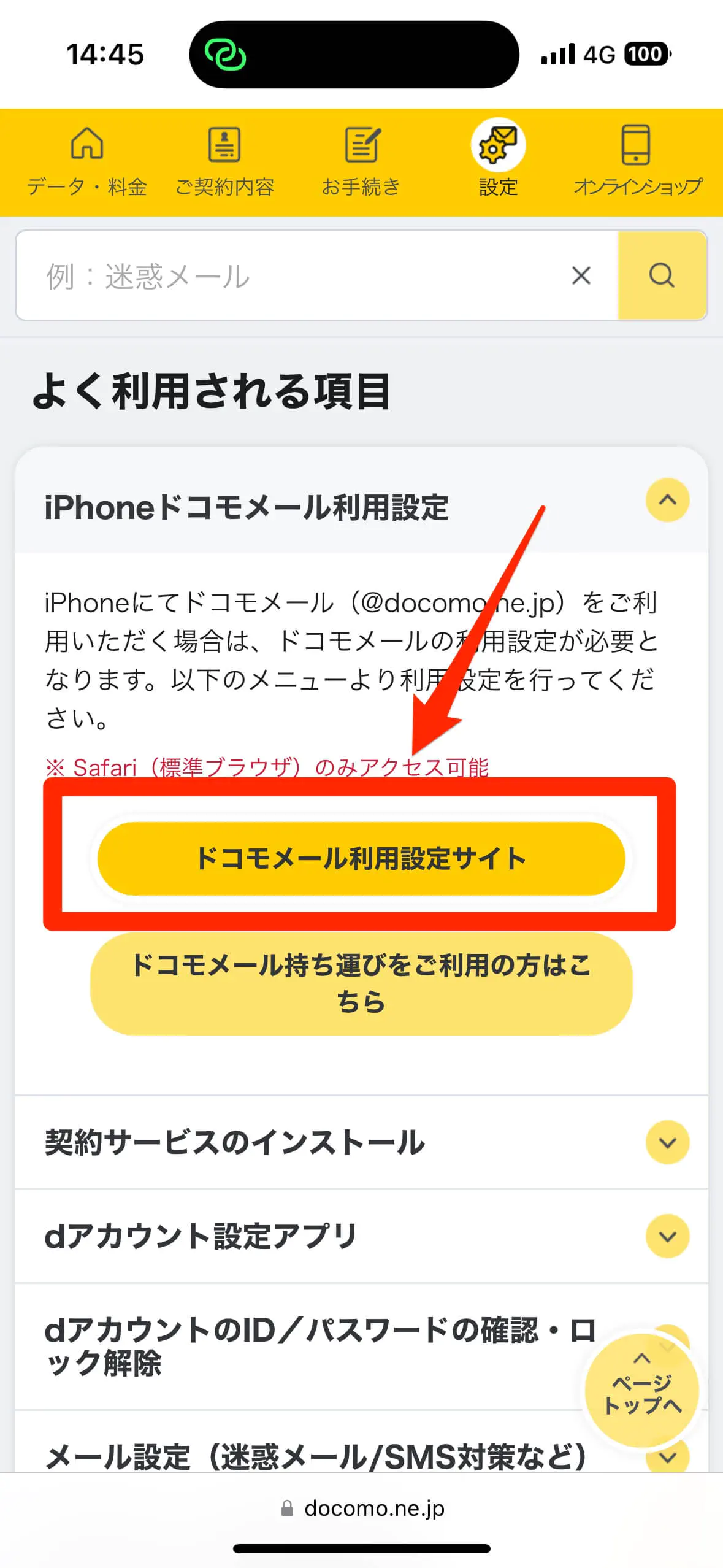
ステップ1:Safariを起動し、「My docomo」またはドコモ公式の「プロファイル一括設定」ページにアクセスします。
ステップ2:「dアカウントでログイン」を選択し、画面の案内に従ってネットワーク暗証番号またはパスキー認証を完了させます。
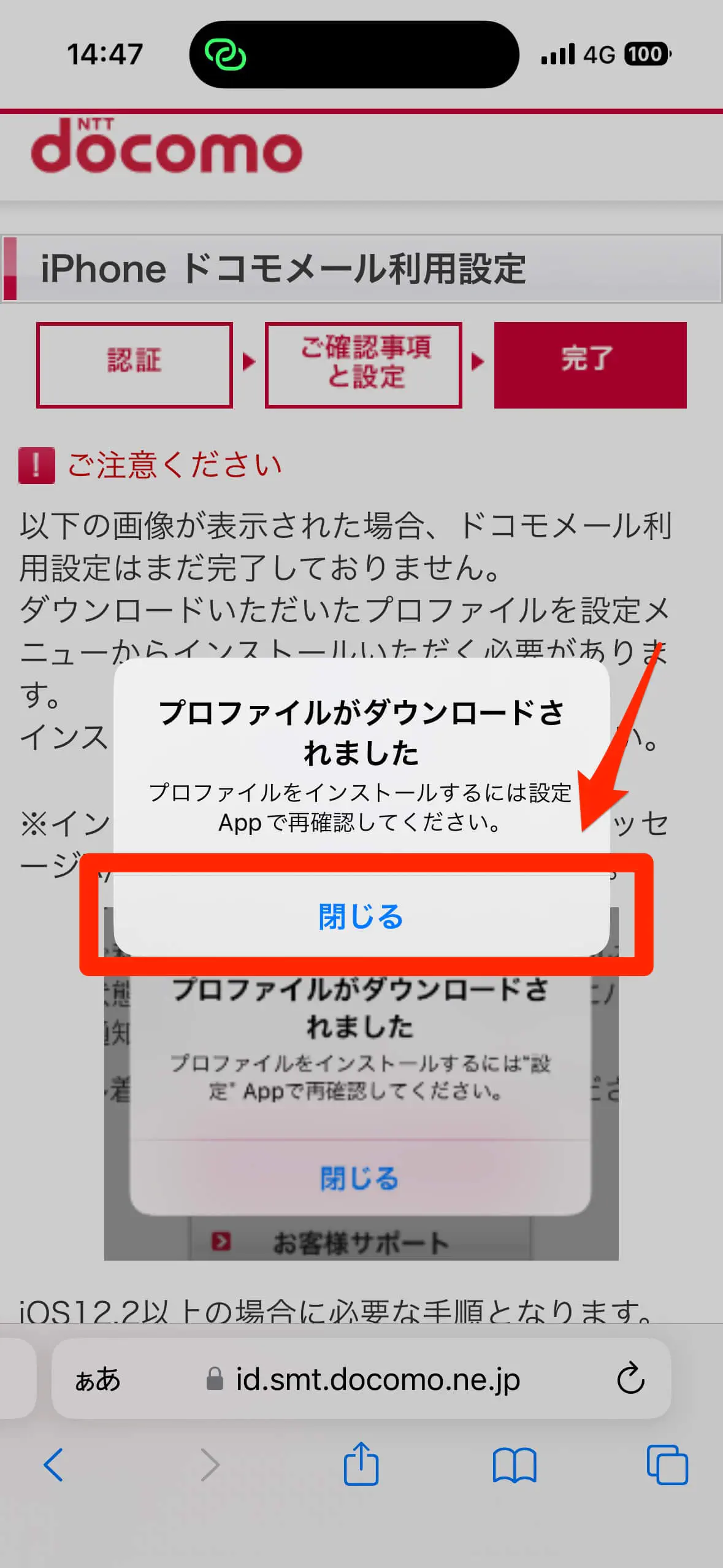
ステップ3:「ドコモメール利用設定」から「構成プロファイルのダウンロード」をタップし、「許可」を選択します。
ステップ4:iPhoneの「設定」アプリを開くと、最上部に「プロファイルがダウンロード済み」と表示されるのでタップします。
ステップ5:画面右上の「インストール」を押し、端末のパスコードを入力して完了させます。

インストールが完了すると、標準メールアプリ内に自動的に「ドコモメール」のアカウントが生成され、クラウド上のデータが数秒から数分で同期されます。

標準メールアプリで送受信できない時の原因とパスワード再設定
ドコモメール iphone 引き継ぎ

プロファイルを導入したにもかかわらず、「メールを取得できません」「ユーザー名またはパスワードが正しくありません」というエラーが出て送受信ができない場合、認証情報の不整合や端末内キャッシュの衝突が疑われます。

まず確認すべきは、dアカウントのパスワード変更履歴です。以前の端末を使っていた時期にdアカウントのパスワードを変更したり、生体認証(パスキー)へ移行したりしている場合、古い認証情報が構成プロファイルと競合することがあります。My docomoにログインし、現在の「dアカウントID」と「パスワード」が正しく機能しているか照合してください。

また、ドコモ側でセキュリティ保護のため「IMAP専用パスワード」の発行が必要なケースもあります。設定アプリ内の「メール」>「アカウント」>「ドコモメール」から、アカウント情報に登録されているパスワードが最新のものと一致しているか再確認することが有効なトラブルシューティングになります。

【ahamo・他社移行】「ドコモメール持ち運び」を利用した引き継ぎの落とし穴

ドコモの通常プランからahamoへ変更したユーザーや、他社キャリアへ乗り換えた後も「ドコモメール持ち運び(月額330円)」を契約しているユーザーは、引き継ぎ手順において特別な注意が求められます。

ahamo契約下では、ドコモ専用の通常プロファイルではなく、「ドコモメール持ち運び専用プロファイル」をインストールしなければ通信が通りません。乗り換え前のプロファイルが残ったまま移行作業を行うと、認証サーバーへのアクセスが弾かれてしまい、受信ボックスが更新されない状態に陥ります。

持ち運びサービスを利用している場合は、My docomoの「契約内容確認」からサービスが正常に継続中であることを確認した上で、専用ページから最新のプロファイルを取得してください。解約から31日を超えて再契約できなかった場合はメールアドレス自体が廃止されている可能性があるため、契約状況のステータス確認が最優先です。

プロファイル一括設定がエラーになる場合の対処法とセキュリティ設定

プロファイルをダウンロードしようとしても「通信エラー」になったり、インストールボタンを押しても進行しなかったりする場合の対処法をまとめました。

1. 古い構成プロファイルの完全削除
クイックスタートによって旧端末の古いプロファイル情報が中途半端に残っていると、新規インストールがブロックされます。「設定」>「一般」>「VPNとデバイス管理」を開き、古い「ドコモメール」関連の構成プロファイルが存在する場合は一度「プロファイルを削除」してから再ダウンロードを試行してください。

2. Safariのプライベートブラウズを解除
Safariが「プライベートブラウズモード」になっていると、プロファイルのダウンロード処理に必要なセッション情報が保持されずエラーになります。通常のブラウジングタブに切り替えてからアクセスします。

3. iOSの「プライベートリレー」を一時オフにする
iCloud+の機能である「プライベートリレー」が有効化されていると、ドコモの回線認証システムが正しくネットワークを判別できない場合があります。「設定」>「Apple ID」>「iCloud」>「プライベートリレー」を一時的にオフにして再試行すると、スムーズに解決します。

【ドコモメールのiPhone引き継ぎ】に関するよくある質問(FAQ)

Q1:iPhoneのクイックスタートを使えば、ドコモメールも自動で引き継がれますか?
A1:自動では引き継がれません。写真や一般アプリのデータは移行されますが、ドコモメールを標準メールアプリで利用するための「構成プロファイル」は手動で再インストールする必要があります。

Q2:機種変更後に過去のメールがすべて消えてしまいました。復元できますか?
A2:復元可能です。ドコモメールはクラウドサーバー上にデータが保存されています。プロファイル設定を正しく完了させれば、過去の送受信履歴や作成したフォルダ構成が自動的に再同期されます。

Q3:プロファイルインストール時に「ネットワークに接続されていません」と出る原因は?
A3:Wi-Fi接続下での認証制限や、iCloudプライベートリレーの干渉が主な原因です。Wi-Fiをオフにしてドコモのモバイルデータ通信に切り替えるか、プライベートリレーを一時停止して再度アクセスしてください。

まとめ:正しいプロファイル設定でトラブルなく快適なメール環境を

iPhoneの機種変更に伴うドコモメールの不具合は、仕組みさえ把握していれば決して難しい問題ではありません。「データはクラウドにあるため消えていない」という事実を理解し、不要な旧プロファイルを整理した上で、最新の構成プロファイルをインストールすることが解決への最短ルートです。

通信環境やdアカウントのセキュリティ認証を整え、手順通りに進めることで、新しいiPhoneでもこれまで通りの快適なメール環境を取り戻せます。 (出典: ドコモメール iphone 引き継ぎ(Yahoo!ニュース)